🧩 AskFred now connects to the tools your team already uses
Your meetings lead to action items. That work happens in other tools. AskFred can now bridge the two with Custom Connectors.
MCP (Model Context Protocol) is an open standard that lets AI tools talk to other apps. Until now, Fireflies worked one way: as an MCP server you could plug into other tools. Today, that flips.
Now you can bring your own MCP servers into AskFred and connect over 100 tools that support the standard, including your own internal tools.
Fireflies AI Custom Connectors for AskFred MCP Video.mp4Here's what that unlocks:
Context from your whole stack: AskFred now draws on all your connected tools, so the answers and content it generates reflect the full picture of your work.
Action, not just answers: Talk through next steps in a sync, then create your Notion Doc, Jira ticket, or Figma design, just by chatting to AskFred.
Bring your own server: Built your own MCP server? AskFred can connect to that, too. Your internal tools work just like off-the-shelf ones.
Setup takes a minute:
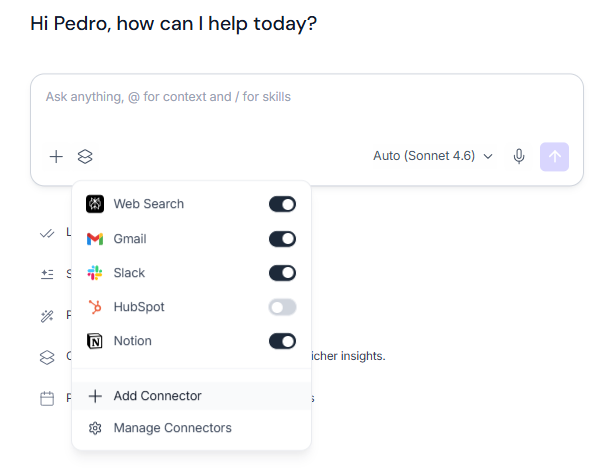
Open AskFred and click Connectors in the left-hand nav
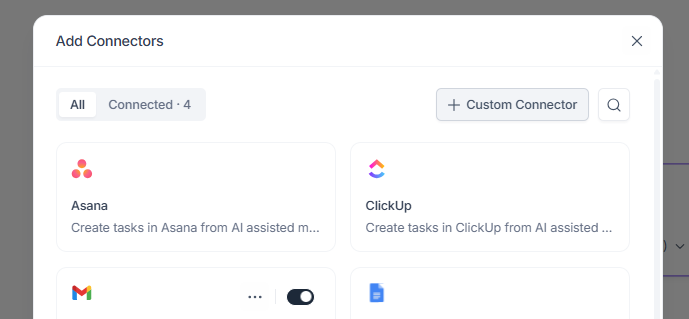
Click Add Connector, then Add Custom Connector
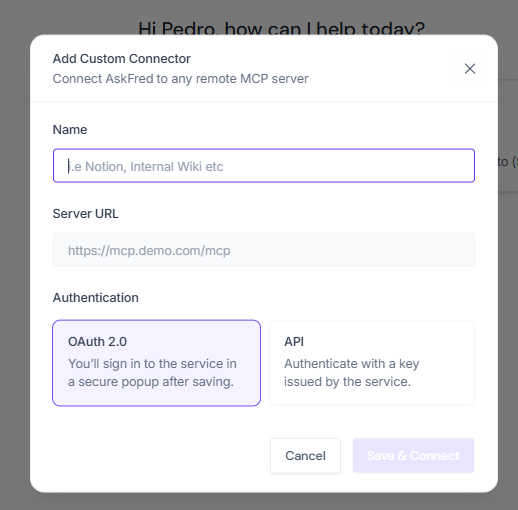
Enter the server URL
Choose your auth: OAuth or API key
That's it, you're connected! Now you can keep everything up-to-date, right from Fireflies.
Which tool are you connecting first? Tell us below—your answers help us decide which connectors to spotlight next!